Showing posts with label Microsoft. Show all posts

Friday, December 12, 2008

Why this kind of message doesn't worry me

OH NOZE! I booted up my Windows XP Tablet Edition laptop this morning to see the following HORRIBLE SCARY sequence of messages:

So am I going to LOSE ALL MY DATA and ALL OF MY PROGRAMS?

Nope. Here's why.

  • I keep all of my data under source control. I mean everything. My Christmas shopping list. My business stuff. The photo of my niece at her 8th birthday party. Everything.
  • I install programs from a network share, never from CDs. When I get a new program on CD I copy the install files to a network share before I run them. The network share is backed up.
  • I keep a log of every program I install. If my hard drive fails (or other disaster strikes) and I need to reinstall all of my programs, I just repeat the steps that I've put in that log. The log is, of course, under source control.

Yeah, I'll look into this failing hard drive. I'll use SpinRite on it and patch it up. But even if I let the drive fail, having followed the aforementioned good habits I'm going to be just fine.

If you're one of the people who would freak out by seeing the above messages, take that as a sign that you're doing it wrong. Stop treating your computer as if it's never going to fail and stop treating your data as if it will always be on your hard drive.

Saturday, July 5, 2008

Autoplay stopped working on internal SD reader

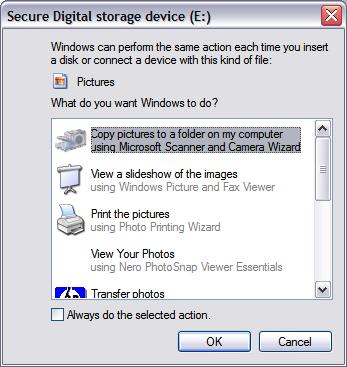
I like using the Microsoft Scanner and Camera Wizard to move my digital photos from my devices to my hard drive. But for some reason Windows XP had stopped running Autoplay when I inserted a CD card into my internal SD card reader, so I wasn't able to use the wizard.

After a bunch of Googling and failed attempts at repair, I finally found the Autoplay Repair Wizard at microsoft.com, and that fixed the problem.

Thursday, May 22, 2008

Dinner with Microsoft

A couple of tech authors, two evangelists from Microsoft and I went to dinner the other night. As the conversation strayed from topic to topic through the night, someone would say, "Oh, you've got to send me a link to that."

So, for those of you who were there: here are all those links.

For those of you who weren't there: These are the kinds of things that geeks talk about when Microsoft treats them to a nice meal.

Thanks for the great night out! I think we had as much fun as our NDAs would allow!

Monday, February 4, 2008

That's Microsoft Certified Technology Specialist Jenks to you

Microsoft.  They know.

I just added MCTS: Microsoft Office SharePoint Server 2007 – Configuration to my collection of Microsoft certifications.

So I suppose I could ask people to call me J.R., M.C.T.S., M.C.P., M.C.S.D.

Friday, January 25, 2008

How I fixed "Error! Reformat Internal media with SigmaTel formatter"

Note to Memorex Products, Inc.: You're welcome for the technical assistance. Feel free to visit my wish list and get me something nice.

I put a blank, formatted SD card in my brand-new Memorex MMP3642A MP3 player and I got the message "Error! Reformat Internal media with SigmaTel formatter". Like many others, I tried a bunch of things (formatting with a PC, for example) and I Googled for help, but nothing seemed to work.

Here's how I fixed the problem. Hope this helps someone.
  1. Install the "Memorex Solid State Digital Audio Player" software.
    • (Note that the manual says you don't have to do this if you're running Windows XP Pro [which I am] but that you should do it anyway to solve this problem.)
    • Put the product CD into your CD-ROM drive.
    • Run D:\MMP3642\Setup.exe and use the default install options. (D: is my CD-ROM drive; yours may have a different letter.)
  2. Put the SD card into your MP3 player. Leave the MP3 player off for now.
  3. Connect the player to your computer with the USB cable.
  4. Push the power button on the MP3 player. Your MP3 player should show a screen that says "MASS STORAGE".
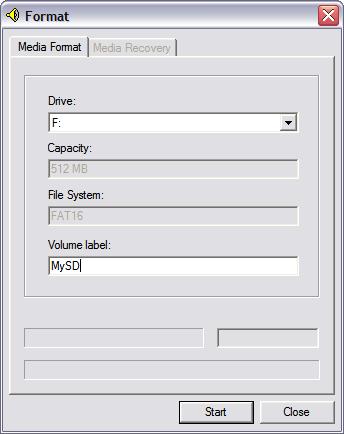
  5. Start | Programs | Memorex Solid State Digital Audio Player | Format
  6. You should see something like this:
  7. Select the second of the two drives. The first drive is the internal memory; you don't want that. For me, I selected F: (the SD card) and not E: (internal memory).
  8. Type the volume label of your choice.
  9. Hit "Start".
  10. When you're done:
    • Hit "Close".
    • Eject the device nicely, using the Safely Remove Hardware tool in your notification area.
    • Unplug the MP3 player's USB cable.
You should now be able to turn on your MP3 player and not see that error message.

Wednesday, May 30, 2007

Beneath Microsoft's Surface

Three things spring to mind regarding Microsoft Surface.
  1. Looks cool!
  2. It reminds me of the desk in David Warner's office in Tron.
  3. What's it made outta?
 

Regarding #3, the details are starting to leak out. Here's what I've pieced together (from a Popular Mechanics article, Robert McLaws' post and Robert Scoble's post).

Operating SystemModified version of Windows XP
Graphics LibraryWindows Presentation Foundation (WPF)
ProcessorCore 2 Duo processor
System RAM2 GB
Graphics card?
Graphics card RAM256 MB
Wireless communicationWiFi and Bluetooth
Display resolution1024 x 768

Wednesday, May 16, 2007

Things I Learned at the Microsoft Developer Conference

Some notes from the day-long dev conference lead by Marc Schweigert from blogs.msdn.com/publicsector and others.

Jim Newkirk, the guy who created JUnit and NUnit, now works for Microsoft. He's working on their automated test stuff.

Microsoft has a new open source project hosting web site: CodePlex. 1,482 projects so far.

www.SDLCinaBox.com:
The goal of SDLC-in-a-Box is to provide a FREE training kit that our partners and consultants can take, customize and deliver to organizations who want to experience a Software Development Lifecycle walkthrough using Visual Studio Team System & Team Foundation Server. It is intended to get individuals and organizations quickly up-to-speed on the Microsoft SDLC tools platform, provide them with a rapid environment for demonstrating and training others, and offer a set of resources to ensure the experience with Visual Studio Team System is a pleasant and successful one.

LINQ (.NET Language Integrated Query) is...
...the general-purpose query facilities added to the .NET Framework that apply to all sources of information, not just relational or XML data. (more...)

At one of my previous companies (which was wiped away when the tech bubble burst) we had a saying: Foosball tables are a sign of a company that will be wiped away when the tech bubble bursts. Microsoft has a foosball table in the hallway outside the dev conference. I'm just saying.


Also, this guy would make great desktop wallpaper:


Other cool things: ASP.NET AJAX.