Showing posts with label subversion. Show all posts
Showing posts with label subversion. Show all posts
Wednesday, July 18, 2007
Using Subversion clients with Team Foundation Server
Brian Harry tells us about SvnBridge, a server bridge that allows Subversion clients to connect to TFS.

Sunday, April 15, 2007
Quick-and-dirty Subversion on a Virtual Machine
(In progress.)
I've gotten busy and my series about Subversion on a LinkStation is going to have to be put on hold. But I really need a Subversion server in the mean time.
In a previous post I'd set up VMWare Server on a spare laptop. I'm going to use that to create a virtual machine (VM) that'll run Subversion.
How quick is this?
All right, it's not that quick. If I were really in a hurry, I'd do one of these things instead:
But setting up a VM-based Subversion server fits into my long-term plans to place Subversion on a LinkStation, especially if I make the VM very similar to a LinkStation running FreeLink.
How dirty is this?
A little dirty. When we're done with this quick-and-dirty setup there will be some some significant shortcomings. (I'll be addressing these shortcomings in my LinkStation project.)
Assumptions
Planning sheet.
Following along with your own setup? For any option where your setup varies from mine fill in the yellow section.
Download the ISO for installing Debian.
Create a virtual machine
It might take you a while to download that ISO, so you may as well create the virtual machine while you're waiting.
Configure the virtual machine
Now we're going to need that ISO, so make sure it's been downloaded before continuing.
Snapshot
Now would be a good time to take a snapshot of the VM. Remember, VMWare Server only allows for one snapshot at time, so a future snapshot will replace this one.
Install Debian
Snapshot
Happy with your setup so far? If you're unhappy, restore that previous snapshot and try again. Aren't VMs wonderful?
Otherwise, here's another good time to take a snapshot of the VM. Although Virtual Server supports snapshots of live systems, I like to cleanly shut down the VM before I take a snapshot. (To do this, log in as root and enter
After the reboot
Install Samba
Install Apache2
Install Subversion
Configure Apache2 and Subversion
I've gotten busy and my series about Subversion on a LinkStation is going to have to be put on hold. But I really need a Subversion server in the mean time.
In a previous post I'd set up VMWare Server on a spare laptop. I'm going to use that to create a virtual machine (VM) that'll run Subversion.
How quick is this?
All right, it's not that quick. If I were really in a hurry, I'd do one of these things instead:
- Get the free(!) Subversion Virtual Machine from Young Technologies.
- Go to wush.net and sign up for one of their US$15/month "Professional" packages (1 SVN Repository and 2 GB disk space).
But setting up a VM-based Subversion server fits into my long-term plans to place Subversion on a LinkStation, especially if I make the VM very similar to a LinkStation running FreeLink.
How dirty is this?
A little dirty. When we're done with this quick-and-dirty setup there will be some some significant shortcomings. (I'll be addressing these shortcomings in my LinkStation project.)
- We won't have a backup and recover plan in place.
- We won't have an uninterruptible power supply, so a loss of power could mess everything up.
- We'll be using the default HTTPS port of 443. We really ought to change that to some other port so that attackers can't easily find the port.
- We'll use apt-get to install things via packages. To allow ourselves to quickly integrate any future security fixes we really should download the source code into a branched repository and build from our own customized branch of that source code.
- Since we'll just plug it into our network the server will have access to the Internet. This will be handy when we were setting up the machine and we need stuff from, say, http://security.debian.org/debian-security/ . But we really don't want a server to have blanket Internet access, in case a bad guy manages to log in and wants to send or receive stuff. We really want to put the server on its own subnet and not bridge that subnet onto the Internet.
- We run Samba on the machine so other machines on the network can find it. Don't even get me started on what a bad idea this is, security-wise.
Assumptions
- You've got a VMWare Server on your network. (If you haven't, see my post "Quick-and-dirty VMWare Server".)
- You want to run Subversion in its most flexible security mode; that is, using WebDAV.
Planning sheet.
Following along with your own setup? For any option where your setup varies from mine fill in the yellow section.
| For... | J.R. used... | But I'll use... |
|---|---|---|
| Operating system | Debian "etch" 4.0 release | |
| Machine name | qad-svn | |
| Domain name | homelan | |
| Size of the first virtual hard drive (hda) | 8.0 GB | |
| Size of the second virtual hard drive (hdb) | 350 GB | |
| Base directory for Subversion settings and repositories | /srv/svn | |
| root password | (He's not telling.) | |
| Other user account | svnadmin | |
| Other user account's password | (He's not telling.) |
Download the ISO for installing Debian.
- Find a Debian install ISO. (I want my virtual machine to match as closely as possible the FreeLink installation, which uses a variant of the Debian "Sarge" 3.1 release. At first I tried to install Sarge, but that proved to be difficult because [I think] the installer doesn't like the fact that the online portion of the install points to files that work for the latest release, Debian "Etch" 4.0. So I went with Etch instead and chose
debian-40r0-i386-netinst.iso.) Find your CD-ROM image at http://www.debian.org/CD/
Create a virtual machine
It might take you a while to download that ISO, so you may as well create the virtual machine while you're waiting.
- We're going to do some tricks with virtual disks that can't be done via a remote VMWare Server Console session. So you're going to have to do one of these two things:
- Sit down at the server and log in without benefit of Remote Desktop, or
- Connect to the server with a Remote Desktop client using the
-consoleoption.
- On the server, run VMware Server Console and connect to localhost.
- File | New | Virtual Machine...
- Use these options:
- Configuration type: Custom
- Guest operating system: Linux
- Version: Other Linux
- Virtual machine name:qad-svn
- Location: C:\Virtual Machines\qad-svn
- Make this virtual machine private: Checked
- Virtual machine account: Local system account
- On host startup: Power on virtual machine
- On host shutdown:Power off virtual machine
- Number of processors: One
- Memory: 128MB
- Network connection: Use bridged networking
- SCSI Adapters: BusLogic
- Disk: Create a new virtual disk
- Virtual Disk Type: IDE
- Disk size (GB): 8.0
- Allocate all disk space now: Unchecked
- Disk file: hda.vmdk
Configure the virtual machine
Now we're going to need that ISO, so make sure it's been downloaded before continuing.
- Edit virtual machine settings
- Connect the CD-ROM to our Debian install ISO. (Use ISO Image: C:\Virtual Machines\ISOs\Debian\etch\debian-40r0-i386-netinst.iso .)
- Create a second hard disk that will store our Subversion settings and repositories.
- Click Add...
- Hardware type: Hard Disk
- Disk: Create a new virtual disk
- Virtual Disk type: IDE
- Disk size (GB): 350.0 GB. Yes, that's a lot, but we're going to use only as much space as the data needs and grow the virtual drive as it needs more. Be really sure you set the next option correctly!
- Allocate all disk space noew: Unchecked. That's the option that you wanted to set correctly.
- Disk file: hdb.vmdk
- We might need to copy things to a USB device some day so we may as well add a USB controller now.
- Click Add...
- Hardware type: USB Controller
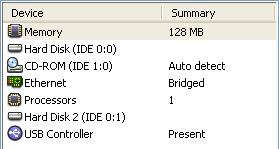
- At this point your Virtual Machine Settings should look something like this:
Snapshot
Now would be a good time to take a snapshot of the VM. Remember, VMWare Server only allows for one snapshot at time, so a future snapshot will replace this one.
Install Debian
- Start the VM.
- Hit Enter when prompted. Debian installation will begin.
- Choose language options.
- Hostname: Use your planning sheet. (J.R. used "qad-svn".)
- Domain name: Use your planning sheet. (J.R. used "homelan".)
- Partioning disks
- hda
- Erase entire disk: IDE1 master (hda)
- Partitioning scheme: All files in one partition
- hdb
- We're going to mount all of hdb as /srv/svn
- On the "This is an overview of your currently..." screen, select IDE1 slave (hdb)
- Create new empty partition table on this device? Yes
- On the "This is an overview of your currently..." screen, select the FREE SPACE item just below IDE1 slave (hdb)
- How to use this free space: Create a new partition
- New partition size: max
- Type for the new partition: Primary
- Change the mount point from /home to /srv/svn
- Done setting up the partition
- Finish partitioning
- Your partitions should look something like this:
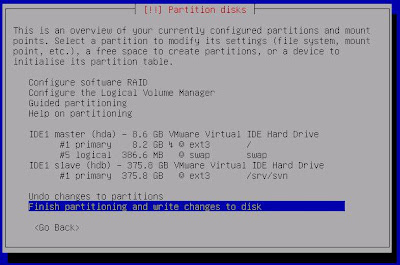
- Finish partitioning and write changes to disk
- (Partitioning the disks and installing the packages took a long time. I walked the dog.)
- Your partitions should look something like this:
- hda
- Set your time zone.
- Installation continues.
- Enter the root password.
- Create the user account. Use your planning sheet. (J.R. used "svnadmin".)
- (Installing the base system also takes a while. Another dog walk.)
- Use a network mirror? Yes.
- At the "Choose software to install" screen uncheck all options. We just want to install a minimal system.
- Install the GRUB boot loader to the master boot record? Yes
- At the "Installation complete" dialog...
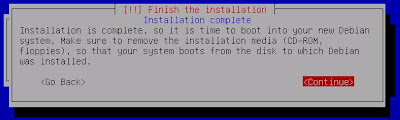
...hit Enter and wait out the reboot.
Snapshot
Happy with your setup so far? If you're unhappy, restore that previous snapshot and try again. Aren't VMs wonderful?
Otherwise, here's another good time to take a snapshot of the VM. Although Virtual Server supports snapshots of live systems, I like to cleanly shut down the VM before I take a snapshot. (To do this, log in as root and enter
shutdown -h now ). This snapshot will replace the previous one.After the reboot
- Log in as root.
- Update the apt package list. Enter:
apt-get update
- Upgrade all currently installed programs. Enter:
apt-get upgrade
(I didn't have anything installed, but this is a good practice if you do and it doesn't do any harm.)
Install Samba
- How do the Windows machines on your resolve the machine name (in my case, "qad-svn") to an IP address? One quick-and-dirty way is to enable Samba on the machine. Enter:
apt-get install samba
Now test it by pinging from another machine:ping qad-svn
Install Apache2
- Enter:
apt-get install apache2
- Test the installation by browsing to the machine's http server (http://qad-svn) from another machine.
Install Subversion
- Use apt-get to install Subversion:
apt-get install subversion
- Install libapache2-svn:
apt-get install libapache2-svn
- Restart apache:
/etc/init.d/apache2 restart
Configure Apache2 and Subversion
- Create the repository structure:
mkdir /srv/svn/repositories
mkdir /srv/svn/apache2 - Allow the apache user to access these directories:
chown www-data:www-data -R /srv/svn
chmod 770 -R /srv/svn - Edit /etc/apache2/mods-available/dav_svn.conf to look like this:
...
<Location /svn>
...
SVNParentPath /srv/svn/repositories
...
AuthType Basic
AuthName "Subversion Repository"
AuthUserFile /srv/svn/apache2/dav_svn.passwd
Require valid-user
...
</Location> - Create a user:
htpasswd2 -c /srv/svn/apache2/dav_svn.passwd tester
- Create an test project:
su www-data
mkdir empty
mkdir empty/trunk
mkdir empty/tags
mkdir empty/branches
svnadmin create /srv/svn/repositories/test_repository
svn import empty file:///srv/svn/repositories/test_repository/test_project -m "initial import"
rmdir empty/trunk
rmdir empty/tags
emptyrmdir empty/branches
rmdir empty
exit - From another machine, make sure you can view the repository in a browser (http://qad-svn/svn/test_repository/)
In progress. Sources include:
Saturday, April 7, 2007
Subversion on LinkStation #5 - Linux Security and Settings
(#5 in my series about Subversion on a LinkStation.)
I needed to make a few changes to the security and settings of my newly-FreeLink-ified LinkStation. Several good articles informed my decisions:
Borrowing heavily from those sources, here's what I did:
(Note that, if we later limit the LinkStation's access to the Internet we'll need to provide an NTP server on the subnet. See http://linkstationwiki.net/index.php?title=Correct_the_system_time_and_setup_Network_Time_Protocol_%28NTP%29 .)
(Might want to include some of the packages from http://linkstationwiki.net/index.php?title=Category:Debian .)
I needed to make a few changes to the security and settings of my newly-FreeLink-ified LinkStation. Several good articles informed my decisions:
- "Freelink - Convert the LinkStation into a Full-fledged Debian Linux Server" at the LinkStationWiki
- A discussion of telnet and root at the LinkStationWiki, which describes a need to reboot that was omitted from the README that came with my FreeLink install
- The README that came with my FreeLink install
Borrowing heavily from those sources, here's what I did:
- Telneted in:
C:\>telnet linkstation
Connecting To linkstation...

Debian GNU/Linux 3.1 %h
root@LinkStation:/# - Tested the Internet connection:
root@LinkStation:/# ping -c 4 www.google.com
PING www.l.google.com (64.233.167.99) 56(84) bytes of data.
64 bytes from py-in-f99.google.com (64.233.167.99): icmp_seq=1 ttl=237 time=18.3 ms
64 bytes from py-in-f99.google.com (64.233.167.99): icmp_seq=2 ttl=237 time=19.1 ms
64 bytes from py-in-f99.google.com (64.233.167.99): icmp_seq=3 ttl=237 time=15.2 ms
64 bytes from py-in-f99.google.com (64.233.167.99): icmp_seq=4 ttl=237 time=29.1 ms

--- www.l.google.com ping statistics ---
4 packets transmitted, 4 received, 0% packet loss, time 3022ms
rtt min/avg/max/mdev = 15.212/20.457/29.167/5.239 ms
root@LinkStation:/# - Changed the root password, using a password from GRC's Ultra High Security
Password Generator. (Of course, I saved that password in a very safe place.)root@LinkStation:/# passwd root
Enter new UNIX password:
Retype new UNIX password:
passwd: password updated successfully
root@LinkStation:/# - Updated the apt package list, which took about 2 minutes to complete:
root@LinkStation:/# apt-get update
Get:1 http://security.debian.org stable/updates/main Packages [398kB]
Get:2 http://security.debian.org stable/updates/main Release [113B]
Get:3 http://mirrors.kernel.org stable/main Packages [4420kB]
Get:4 http://mirrors.kernel.org stable/main Release [98B]
Get:5 http://mirrors.kernel.org stable/main Sources [1323kB]
Get:6 http://mirrors.kernel.org stable/main Release [97B]
Fetched 6141kB in 1m1s (99.7kB/s)
Reading Package Lists... Done
root@LinkStation:/# - Installed SSH:
root@LinkStation:/# apt-get install ssh
An installation prompt appeared, but I just waited and it answered "Yes" all by itself.Unpacking ssh (from .../ssh_1%3a3.8.1p1-8.sarge.6_powerpc.deb) ...
Setting up ssh (3.8.1p1-8.sarge.6) ...
Creating SSH2 RSA key; this may take some time ...
Creating SSH2 DSA key; this may take some time ...
Restarting OpenBSD Secure Shell server: sshd.
root@LinkStation:/# - Tested SSH with the PuTTY client on my Windows machine:
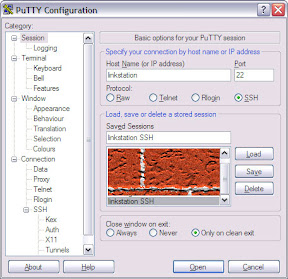
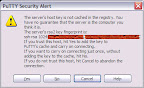
login as: root
Once PuTTY was running, I closed the telnet session and did the rest of the work using PuTTY, 'cause it's better at ANSI.
Using keyboard-interactive authentication.
Password:
LinkStation:~# - Changed the telnet root login so it will require a password. First — and this is the part that isn't covered in the README but is covered in that discussion of telnet and root at the LinkStationWiki — I rebooted:
LinkStation:~# reboot
I ran the vi editor:
Broadcast message from root (pts/1) (Sun Dec 14 23:41:08 2003):
The system is going down for reboot NOW!
LinkStation:~#
and changed
LinkStation:~# vi /etc/init.d/utelnetd/sbin/utelnetd -l /bin/bash &
to/sbin/utelnetd -l /bin/login &
If you need to know how to use the vi editor, try Tobias von Petersdorff's "vi basics". - Tested to make sure that telnet now requires a password. Since telnet won't let us log in as root any more I needed to create a temporary user. In PuTTY:
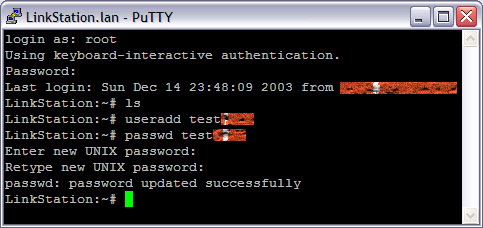
And then in telnet: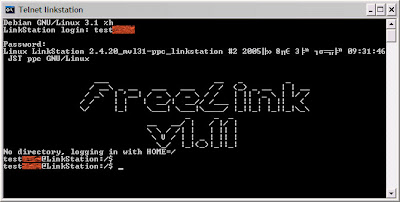
Thenexitfrom telnet and, in PuTTY: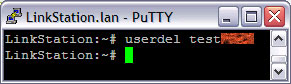
- Upgraded all currently installed programs:
LinkStation:~# apt-get upgrade
Reading Package Lists... Done
Building Dependency Tree... Done
The following packages will be upgraded:
  base-config bsdutils cpio exim4 exim4-base exim4-config exim4-daemon-light
  gzip info libc6 libgcc1 libgnutls11 libpcre3 libperl5.8 libssl0.9.7
  libtasn1-2 login man-db mount passwd perl-base ppp tar util-linux zlib1g
25 upgraded, 0 newly installed, 0 to remove and 0 not upgraded.
Need to get 11.7MB of archives.
After unpacking 295kB of additional disk space will be used.
Do you want to continue? [Y/n] Y
Get:1 http://mirrors.kernel.org stable/main bsdutils 1:2.12p-4sarge1 [66.0kB]
Get:2 http://mirrors.kernel.org stable/main gzip 1.3.5-10sarge2 [76.9kB]
Get:3 http://mirrors.kernel.org stable/main login 1:4.0.3-31sarge9 [584kB]
Get:4 http://mirrors.kernel.org stable/main mount 2.12p-4sarge1 [147kB]
Get:5 http://mirrors.kernel.org stable/main libperl5.8 5.8.4-8sarge5 [998B]
Get:6 http://mirrors.kernel.org stable/main perl-base 5.8.4-8sarge5 [790kB]
Get:7 http://mirrors.kernel.org stable/main tar 1.14-2.3 [507kB]
Get:8 http://mirrors.kernel.org stable/main util-linux 2.12p-4sarge1 [406kB]
Get:9 http://mirrors.kernel.org stable/main libc6 2.3.2.ds1-22sarge6 [4238kB]
Get:10 http://mirrors.kernel.org stable/main libgcc1 1:3.4.3-13sarge1 [90.0kB]
Get:11 http://mirrors.kernel.org stable/main exim4-config 4.50-8sarge2 [243kB]
Get:12 http://mirrors.kernel.org stable/main exim4-base 4.50-8sarge2 [821kB]
Get:13 http://mirrors.kernel.org stable/main passwd 1:4.0.3-31sarge9 [566kB]
Get:14 http://mirrors.kernel.org stable/main zlib1g 1:1.2.2-4.sarge.2 [69.7kB]
Get:15 http://mirrors.kernel.org stable/main cpio 2.5-1.3 [67.7kB]
Get:16 http://mirrors.kernel.org stable/main libtasn1-2 0.2.10-3sarge1 [43.0kB]
Get:17 http://mirrors.kernel.org stable/main libgnutls11 1.0.16-13.2sarge2 [300kB]
Get:18 http://mirrors.kernel.org stable/main libpcre3 4.5-1.2sarge1 [110kB]
Get:19 http://mirrors.kernel.org stable/main exim4-daemon-light 4.50-8sarge2 [387kB]
Get:20 http://mirrors.kernel.org stable/main exim4 4.50-8sarge2 [1122B]
Get:21 http://mirrors.kernel.org stable/main info 4.7-2.2sarge2 [190kB]
Get:22 http://mirrors.kernel.org stable/main man-db 2.4.2-21sarge1 [602kB]
Get:23 http://mirrors.kernel.org stable/main libssl0.9.7 0.9.7e-3sarge4 [779kB]
Get:24 http://mirrors.kernel.org stable/main base-config 2.53.10.2 [307kB]
Get:25 http://mirrors.kernel.org stable/main ppp 2.4.3-20050321+2sarge1 [351kB]
Fetched 11.7MB in 2m7s (92.3kB/s)
Preconfiguring packages ...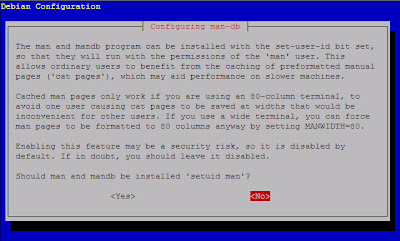
Say "No" to "Should man and mandb be installed 'setuid man'?".tar: ./postinst: time stamp 2005-09-18 02:49:51 is 55557829 s in the future
tar: ./prerm: time stamp 2005-09-18 02:49:51 is 55557829 s in the future
tar: ./control: time stamp 2005-09-18 02:49:55 is 55557833 s in the future
tar: .: time stamp 2005-09-18 02:49:55 is 55557833 s in the future
(Reading database ... 7660 files and directories currently installed.)
Preparing to replace bsdutils 1:2.12p-4 (using .../bsdutils_1%3a2.12p-4sarge1_powerpc.deb) ...
Unpacking replacement bsdutils ...
Setting up bsdutils (2.12p-4sarge1) ...
tar: ./postinst: time stamp 2006-09-16 19:14:24 is 86980102 s in the future
tar: ./preinst: time stamp 2006-09-16 19:14:24 is 86980102 s in the future
tar: ./prerm: time stamp 2006-09-16 19:14:24 is 86980102 s in the future
tar: ./md5sums: time stamp 2006-09-16 19:14:26 is 86980104 s in the future
tar: ./control: time stamp 2006-09-16 19:14:25 is 86980103 s in the future
tar: .: time stamp 2006-09-16 19:14:26 is 86980104 s in the future
(Reading database ... 7660 files and directories currently installed.)
Preparing to replace gzip 1.3.5-10 (using .../gzip_1.3.5-10sarge2_powerpc.deb) ...
Unpacking replacement gzip ...
Setting up gzip (1.3.5-10sarge2) ...
tar: ./postinst: time stamp 2006-08-13 18:31:45 is 84039941 s in the future
tar: ./preinst: time stamp 2006-08-13 18:31:45 is 84039941 s in the future
tar: ./conffiles: time stamp 2006-08-13 18:31:45 is 84039941 s in the future
tar: ./md5sums: time stamp 2006-08-13 18:31:47 is 84039943 s in the future
tar: ./control: time stamp 2006-08-13 18:31:46 is 84039942 s in the future
tar: .: time stamp 2006-08-13 18:31:47 is 84039943 s in the future
(Reading database ... 7660 files and directories currently installed.)
Preparing to replace login 1:4.0.3-31sarge5 (using .../login_1%3a4.0.3-31sarge9_powerpc.deb) ...
Unpacking replacement login ...
Setting up login (4.0.3-31sarge9) ...
tar: ./postinst: time stamp 2005-09-18 02:49:45 is 55557818 s in the future
tar: ./prerm: time stamp 2005-09-18 02:49:45 is 55557818 s in the future
tar: ./control: time stamp 2005-09-18 02:49:49 is 55557822 s in the future
tar: .: time stamp 2005-09-18 02:49:49 is 55557822 s in the future
(Reading database ... 7660 files and directories currently installed.)
Preparing to replace mount 2.12p-4 (using .../mount_2.12p-4sarge1_powerpc.deb) ...
Unpacking replacement mount ...
Setting up mount (2.12p-4sarge1) ...
tar: ./postinst: time stamp 2006-08-04 17:42:07 is 83259360 s in the future
tar: ./md5sums: time stamp 2006-08-04 17:42:07 is 83259360 s in the future
tar: ./control: time stamp 2006-08-04 17:42:08 is 83259361 s in the future
tar: .: time stamp 2006-08-04 17:42:08 is 83259361 s in the future
(Reading database ... 7660 files and directories currently installed.)
Preparing to replace libperl5.8 5.8.4-8 (using .../libperl5.8_5.8.4-8sarge5_powerpc.deb) ...
Unpacking replacement libperl5.8 ...
tar: ./shlibs: time stamp 2006-08-04 17:41:47 is 83259339 s in the future
tar: ./md5sums: time stamp 2006-08-04 17:41:47 is 83259339 s in the future
tar: ./control: time stamp 2006-08-04 17:41:49 is 83259341 s in the future
tar: .: time stamp 2006-08-04 17:41:49 is 83259341 s in the future
Preparing to replace perl-base 5.8.4-8 (using .../perl-base_5.8.4-8sarge5_powerpc.deb) ...
Unpacking replacement perl-base ...
Setting up perl-base (5.8.4-8sarge5) ...
tar: ./postinst: time stamp 2006-11-30 21:58:23 is 93473533 s in the future
tar: ./preinst: time stamp 2006-11-30 21:58:23 is 93473533 s in the future
tar: ./prerm: time stamp 2006-11-30 21:58:23 is 93473533 s in the future
tar: ./postrm: time stamp 2006-11-30 21:58:23 is 93473533 s in the future
tar: ./conffiles: time stamp 2006-11-30 21:55:31 is 93473361 s in the future
tar: ./md5sums: time stamp 2006-11-30 21:58:24 is 93473534 s in the future
tar: ./control: time stamp 2006-11-30 21:58:24 is 93473534 s in the future
tar: .: time stamp 2006-11-30 21:58:24 is 93473534 s in the future
(Reading database ... 7660 files and directories currently installed.)
Preparing to replace tar 1.14-2 (using .../tar_1.14-2.3_powerpc.deb) ...
Unpacking replacement tar ...
Setting up tar (1.14-2.3) ...
tar: ./preinst: time stamp 2005-09-18 02:48:15 is 55557723 s in the future
tar: ./postinst: time stamp 2005-09-18 02:48:15 is 55557723 s in the future
tar: ./prerm: time stamp 2005-09-18 02:48:15 is 55557723 s in the future
tar: ./postrm: time stamp 2005-09-18 02:48:15 is 55557723 s in the future
tar: ./conffiles: time stamp 2005-09-18 02:48:15 is 55557723 s in the future
tar: ./control: time stamp 2005-09-18 02:48:26 is 55557734 s in the future
tar: .: time stamp 2005-09-18 02:48:26 is 55557734 s in the future
(Reading database ... 7660 files and directories currently installed.)
Preparing to replace util-linux 2.12p-4 (using .../util-linux_2.12p-4sarge1_powerpc.deb) ...
Unpacking replacement util-linux ...
Setting up util-linux (2.12p-4sarge1) ...
tar: ./shlibs: time stamp 2007-03-05 17:17:12 is 101664656 s in the future
tar: ./postinst: time stamp 2007-03-05 17:17:14 is 101664658 s in the future
tar: ./preinst: time stamp 2007-03-05 17:17:14 is 101664658 s in the future
tar: ./postrm: time stamp 2007-03-05 17:17:14 is 101664658 s in the future
tar: ./md5sums: time stamp 2007-03-05 17:17:16 is 101664660 s in the future
tar: ./control: time stamp 2007-03-05 17:17:15 is 101664659 s in the future
tar: .: time stamp 2007-03-05 17:17:15 is 101664659 s in the future
(Reading database ... 7660 files and directories currently installed.)
Preparing to replace libc6 2.3.2.ds1-22 (using .../libc6_2.3.2.ds1-22sarge6_powerpc.deb) ...
Unpacking replacement libc6 ...
Setting up libc6 (2.3.2.ds1-22sarge6) ...
Current default timezone: 'US/Eastern'.
Local time is now: Mon Dec 15 01:06:24 EST 2003.
Universal Time is now: Mon Dec 15 06:06:24 UTC 2003.
Run 'tzconfig' if you wish to change it.
tar: ./shlibs: time stamp 2006-08-10 13:57:18 is 83764252 s in the future
tar: ./postinst: time stamp 2006-08-10 13:57:24 is 83764258 s in the future
tar: ./control: time stamp 2006-08-10 13:57:24 is 83764258 s in the future
tar: ./postrm: time stamp 2006-08-10 13:57:24 is 83764258 s in the future
tar: ./md5sums: time stamp 2006-08-10 13:57:24 is 83764258 s in the future
tar: .: time stamp 2006-08-10 13:57:24 is 83764258 s in the future
(Reading database ... 7699 files and directories currently installed.)
Preparing to replace libgcc1 1:3.4.3-13 (using .../libgcc1_1%3a3.4.3-13sarge1_powerpc.deb) ...
Unpacking replacement libgcc1 ...
Setting up libgcc1 (3.4.3-13sarge1) ...
tar: ./config: time stamp 2006-04-11 08:33:28 is 73290422 s in the future
tar: ./templates: time stamp 2006-04-11 08:33:37 is 73290431 s in the future
tar: ./postinst: time stamp 2006-04-11 08:33:41 is 73290435 s in the future
tar: ./postrm: time stamp 2006-04-11 08:33:41 is 73290435 s in the future
tar: ./conffiles: time stamp 2006-04-11 08:33:41 is 73290435 s in the future
tar: ./md5sums: time stamp 2006-04-11 08:33:42 is 73290436 s in the future
tar: ./control: time stamp 2006-04-11 08:33:42 is 73290436 s in the future
tar: .: time stamp 2006-04-11 08:33:42 is 73290436 s in the future
(Reading database ... 7699 files and directories currently installed.)
Preparing to replace exim4-config 4.50-8 (using .../exim4-config_4.50-8sarge2_all.deb) ...
Unpacking replacement exim4-config ...
^Atar: ./config: time stamp 2006-04-11 16:55:14 is 73320523 s in the future
tar: ./templates: time stamp 2006-04-11 16:55:19 is 73320528 s in the future
tar: ./postinst: time stamp 2006-04-11 16:55:27 is 73320536 s in the future
tar: ./prerm: time stamp 2006-04-11 16:55:27 is 73320536 s in the future
tar: ./postrm: time stamp 2006-04-11 16:55:27 is 73320536 s in the future
tar: ./conffiles: time stamp 2006-04-11 16:55:27 is 73320536 s in the future
tar: ./md5sums: time stamp 2006-04-11 16:55:32 is 73320541 s in the future
tar: ./control: time stamp 2006-04-11 16:55:30 is 73320539 s in the future
tar: .: time stamp 2006-04-11 16:55:32 is 73320541 s in the future
Preparing to replace exim4-base 4.50-8 (using .../exim4-base_4.50-8sarge2_powerpc.deb) ...
Unpacking replacement exim4-base ...
tar: ./config: time stamp 2006-08-13 18:31:39 is 84039903 s in the future
tar: ./templates: time stamp 2006-08-13 18:31:44 is 84039908 s in the future
tar: ./postinst: time stamp 2006-08-13 18:31:45 is 84039909 s in the future
tar: ./preinst: time stamp 2006-08-13 18:31:45 is 84039909 s in the future
tar: ./postrm: time stamp 2006-08-13 18:31:45 is 84039909 s in the future
tar: ./conffiles: time stamp 2006-08-13 18:31:45 is 84039909 s in the future
tar: ./md5sums: time stamp 2006-08-13 18:31:47 is 84039911 s in the future
tar: ./control: time stamp 2006-08-13 18:31:46 is 84039910 s in the future
tar: .: time stamp 2006-08-13 18:31:47 is 84039911 s in the future
Preparing to replace passwd 1:4.0.3-31sarge5 (using .../passwd_1%3a4.0.3-31sarge9_powerpc.deb) ...
Unpacking replacement passwd ...
Setting up passwd (4.0.3-31sarge9) ...
tar: ./postinst: time stamp 2005-07-14 17:13:49 is 49907225 s in the future
tar: ./preinst: time stamp 2005-07-14 17:13:49 is 49907225 s in the future
tar: ./shlibs: time stamp 2005-07-14 17:13:10 is 49907186 s in the future
tar: ./md5sums: time stamp 2005-07-14 17:13:50 is 49907226 s in the future
tar: ./control: time stamp 2005-07-14 17:13:51 is 49907227 s in the future
tar: .: time stamp 2005-07-14 17:13:51 is 49907227 s in the future
(Reading database ... 7699 files and directories currently installed.)
Preparing to replace zlib1g 1:1.2.2-4 (using .../zlib1g_1%3a1.2.2-4.sarge.2_powerpc.deb) ...
Unpacking replacement zlib1g ...
Setting up zlib1g (1.2.2-4.sarge.2) ...
tar: ./preinst: time stamp 2005-10-02 12:04:03 is 56800638 s in the future
tar: ./postinst: time stamp 2005-10-02 12:04:03 is 56800638 s in the future
tar: ./prerm: time stamp 2005-10-02 12:04:03 is 56800638 s in the future
tar: ./control: time stamp 2005-10-02 12:04:09 is 56800644 s in the future
tar: .: time stamp 2005-10-02 12:04:09 is 56800644 s in the future
(Reading database ... 7699 files and directories currently installed.)
Preparing to replace cpio 2.5-1.2 (using .../cpio_2.5-1.3_powerpc.deb) ...
Unpacking replacement cpio ...
tar: ./shlibs: time stamp 2006-02-11 16:28:47 is 68224922 s in the future
tar: ./postinst: time stamp 2006-02-11 16:28:48 is 68224923 s in the future
tar: ./postrm: time stamp 2006-02-11 16:28:48 is 68224923 s in the future
tar: ./md5sums: time stamp 2006-02-11 16:29:08 is 68224943 s in the future
tar: ./control: time stamp 2006-02-11 16:29:07 is 68224942 s in the future
tar: .: time stamp 2006-02-11 16:29:08 is 68224943 s in the future
Preparing to replace libtasn1-2 0.2.10-3 (using .../libtasn1-2_0.2.10-3sarge1_powerpc.deb) ...
Unpacking replacement libtasn1-2 ...
tar: ./shlibs: time stamp 2006-09-20 08:07:18 is 87285633 s in the future
tar: ./postinst: time stamp 2006-09-20 08:13:41 is 87286016 s in the future
tar: ./postrm: time stamp 2006-09-20 08:13:41 is 87286016 s in the future
tar: ./md5sums: time stamp 2006-09-20 08:13:51 is 87286026 s in the future
tar: ./control: time stamp 2006-09-20 08:13:51 is 87286026 s in the future
tar: .: time stamp 2006-09-20 08:13:51 is 87286026 s in the future
Preparing to replace libgnutls11 1.0.16-13.1 (using .../libgnutls11_1.0.16-13.2sarge2_powerpc.deb) ...
Unpacking replacement libgnutls11 ...
tar: ./shlibs: time stamp 2005-08-24 15:16:00 is 53442554 s in the future
tar: ./postinst: time stamp 2005-08-24 15:16:00 is 53442554 s in the future
tar: ./postrm: time stamp 2005-08-24 15:16:00 is 53442554 s in the future
tar: ./md5sums: time stamp 2005-08-24 15:16:03 is 53442557 s in the future
tar: ./control: time stamp 2005-08-24 15:16:02 is 53442556 s in the future
tar: .: time stamp 2005-08-24 15:16:03 is 53442557 s in the future
Preparing to replace libpcre3 4.5-1.2 (using .../libpcre3_4.5-1.2sarge1_powerpc.deb) ...
Unpacking replacement libpcre3 ...
tar: ./postinst: time stamp 2006-04-11 16:55:27 is 73320521 s in the future
tar: ./prerm: time stamp 2006-04-11 16:55:27 is 73320521 s in the future
tar: ./md5sums: time stamp 2006-04-11 16:55:32 is 73320526 s in the future
tar: ./control: time stamp 2006-04-11 16:55:30 is 73320524 s in the future
tar: .: time stamp 2006-04-11 16:55:32 is 73320526 s in the future
Preparing to replace exim4-daemon-light 4.50-8 (using .../exim4-daemon-light_4.50-8sarge2_powerpc.deb) ...
Stopping MTA: exim4.
Unpacking replacement exim4-daemon-light ...
tar: ./md5sums: time stamp 2006-04-11 08:33:42 is 73290415 s in the future
tar: ./control: time stamp 2006-04-11 08:33:42 is 73290415 s in the future
tar: .: time stamp 2006-04-11 08:33:42 is 73290415 s in the future
Preparing to replace exim4 4.50-8 (using .../exim4_4.50-8sarge2_all.deb) ...
Unpacking replacement exim4 ...
tar: ./postinst: time stamp 2006-11-21 15:37:51 is 92673064 s in the future
tar: ./prerm: time stamp 2006-11-21 15:37:51 is 92673064 s in the future
tar: ./postrm: time stamp 2006-11-21 15:37:51 is 92673064 s in the future
tar: ./md5sums: time stamp 2006-11-21 15:37:54 is 92673067 s in the future
tar: ./control: time stamp 2006-11-21 15:37:54 is 92673067 s in the future
tar: .: time stamp 2006-11-21 15:37:54 is 92673067 s in the future
Preparing to replace info 4.7-2.2 (using .../info_4.7-2.2sarge2_powerpc.deb) ...
Unpacking replacement info ...
tar: ./config: time stamp 2006-11-09 12:15:59 is 91624151 s in the future
tar: ./templates: time stamp 2006-11-09 12:16:05 is 91624157 s in the future
tar: ./postinst: time stamp 2006-11-09 12:16:07 is 91624159 s in the future
tar: ./preinst: time stamp 2006-11-09 12:16:07 is 91624159 s in the future
tar: ./prerm: time stamp 2006-11-09 12:16:07 is 91624159 s in the future
tar: ./postrm: time stamp 2006-11-09 12:16:07 is 91624159 s in the future
tar: ./conffiles: time stamp 2006-11-09 12:16:07 is 91624159 s in the future
tar: ./md5sums: time stamp 2006-11-09 12:16:09 is 91624161 s in the future
tar: ./control: time stamp 2006-11-09 12:16:09 is 91624161 s in the future
tar: .: time stamp 2006-11-09 12:16:09 is 91624161 s in the future
Preparing to replace man-db 2.4.2-21 (using .../man-db_2.4.2-21sarge1_powerpc.deb) ...
Unpacking replacement man-db ...
tar: ./templates: time stamp 2006-09-30 06:41:32 is 88144483 s in the future
tar: ./shlibs: time stamp 2006-09-30 06:41:57 is 88144508 s in the future
tar: ./control: time stamp 2006-09-30 06:41:55 is 88144506 s in the future
tar: ./postinst: time stamp 2006-09-30 06:41:57 is 88144508 s in the future
tar: ./preinst: time stamp 2006-09-30 06:41:57 is 88144508 s in the future
tar: ./prerm: time stamp 2006-09-30 06:41:57 is 88144508 s in the future
tar: ./postrm: time stamp 2006-09-30 06:41:57 is 88144508 s in the future
tar: ./md5sums: time stamp 2006-09-30 06:41:58 is 88144509 s in the future
tar: .: time stamp 2006-09-30 06:41:58 is 88144509 s in the future
Preparing to replace libssl0.9.7 0.9.7e-3 (using .../libssl0.9.7_0.9.7e-3sarge4_powerpc.deb) ...
Unpacking replacement libssl0.9.7 ...
tar: ./templates: time stamp 2006-06-11 14:25:41 is 78581931 s in the future
tar: ./postinst: time stamp 2006-06-11 14:25:43 is 78581933 s in the future
tar: ./postrm: time stamp 2006-06-11 14:25:43 is 78581933 s in the future
tar: ./conffiles: time stamp 2006-06-11 14:25:43 is 78581933 s in the future
tar: ./md5sums: time stamp 2006-06-11 14:25:44 is 78581934 s in the future
tar: ./control: time stamp 2006-06-11 14:25:44 is 78581934 s in the future
tar: .: time stamp 2006-06-11 14:25:44 is 78581934 s in the future
Preparing to replace base-config 2.53.10 (using .../base-config_2.53.10.2_all.deb) ...
Unpacking replacement base-config ...
tar: ./md5sums: time stamp 2006-06-03 23:48:55 is 77924524 s in the future
tar: ./postinst: time stamp 2006-06-03 23:49:12 is 77924541 s in the future
tar: ./prerm: time stamp 2006-06-03 23:49:12 is 77924541 s in the future
tar: ./postrm: time stamp 2006-06-03 23:49:12 is 77924541 s in the future
tar: ./conffiles: time stamp 2006-06-03 23:49:12 is 77924541 s in the future
tar: ./control: time stamp 2006-06-03 23:49:15 is 77924544 s in the future
tar: .: time stamp 2006-06-03 23:49:15 is 77924544 s in the future
Preparing to replace ppp 2.4.3-20050321+2 (using .../ppp_2.4.3-20050321+2sarge1_powerpc.deb) ...
Unpacking replacement ppp ...
Setting up libperl5.8 (5.8.4-8sarge5) ...
Setting up exim4-config (4.50-8sarge2) ...
Setting up exim4-base (4.50-8sarge2) ...
Setting up cpio (2.5-1.3) ...
Setting up libtasn1-2 (0.2.10-3sarge1) ...
Setting up libgnutls11 (1.0.16-13.2sarge2) ...
Setting up libpcre3 (4.5-1.2sarge1) ...
Setting up exim4-daemon-light (4.50-8sarge2) ...
Starting MTA: exim4.
Setting up exim4 (4.50-8sarge2) ...
Setting up info (4.7-2.2sarge2) ...
Setting up man-db (2.4.2-21sarge1) ...
Setting up libssl0.9.7 (0.9.7e-3sarge4) ...
Setting up base-config (2.53.10.2) ...
Setting up ppp (2.4.3-20050321+2sarge1) ...
LinkStation:~# - Correct the LinkStation time zone setting. I'm in the U.S. Central time zone.
LinkStation:~# tzconfig
Installed NTP.
Your current time zone is set to US/Eastern
Do you want to change that? [n]: y
Please enter the number of the geographic area in which you live:
1) Africa 7) Australia
2) America 8) Europe
3) US time zones 9) Indian Ocean
4) Canada time zones 10) Pacific Ocean
5) Asia 11) Use System V style time zones
6) Atlantic Ocean 12) None of the above
Then you will be shown a list of cities which represent the time zone
in which they are located. You should choose a city in your time zone.
Number: 3
Alaska Aleutian Arizona Central East-Indiana Eastern Hawaii Indiana-Starke
Michigan Mountain Pacific Samoa
Please enter the name of one of these cities or zones
You just need to type enough letters to resolve ambiguities
Press Enter to view all of them again
Name: [] Central
Your default time zone is set to 'US/Central'.
Local time is now: Mon Dec 15 00:18:34 CST 2003.
Universal Time is now: Mon Dec 15 06:18:34 UTC 2003.
LinkStation:~#LinkStation:~# apt-get install ntp ntp-simple ntpdate
Tested to make sure the system knows the current time and date:
Reading Package Lists... Done
Building Dependency Tree... Done
The following extra packages will be installed:
ntp-server perl perl-modules
Suggested packages:
ntp-doc libterm-readline-gnu-perl libterm-readline-perl-perl
Recommended packages:
perl-doc
The following NEW packages will be installed:
ntp ntp-server ntp-simple ntpdate perl perl-modules
0 upgraded, 6 newly installed, 0 to remove and 0 not upgraded.
Need to get 6159kB of archives.
After unpacking 23.7MB of additional disk space will be used.
Do you want to continue? [Y/n] Y
Get:1 http://mirrors.kernel.org stable/main perl-modules 5.8.4-8sarge5 [2179kB]
Get:2 http://mirrors.kernel.org stable/main perl 5.8.4-8sarge5 [3509kB]
Get:3 http://mirrors.kernel.org stable/main ntp 1:4.2.0a+stable-2sarge1 [266kB]
Get:4 http://mirrors.kernel.org stable/main ntp-simple 1:4.2.0a+stable-2sarge1 [129kB]
Get:5 http://mirrors.kernel.org stable/main ntp-server 1:4.2.0a+stable-2sarge1 [31.9kB]
Get:6 http://mirrors.kernel.org stable/main ntpdate 1:4.2.0a+stable-2sarge1 [43.7kB]
Fetched 6159kB in 56s (108kB/s)
tar: ./conffiles: time stamp 2006-05-09 23:33:28 is 75766305 s in the future
tar: ./md5sums: time stamp 2006-05-09 23:33:28 is 75766305 s in the future
tar: ./control: time stamp 2006-05-09 23:33:29 is 75766306 s in the future
tar: .: time stamp 2006-05-09 23:33:29 is 75766306 s in the future
Selecting previously deselected package perl-modules.
(Reading database ... 7699 files and directories currently installed.)
Unpacking perl-modules (from .../perl-modules_5.8.4-8sarge5_all.deb) ...
tar: ./postinst: time stamp 2006-08-04 16:42:12 is 83258425 s in the future
tar: ./md5sums: time stamp 2006-08-04 16:42:12 is 83258425 s in the future
tar: ./control: time stamp 2006-08-04 16:42:15 is 83258428 s in the future
tar: .: time stamp 2006-08-04 16:42:15 is 83258428 s in the future
Selecting previously deselected package perl.
Unpacking perl (from .../perl_5.8.4-8sarge5_powerpc.deb) ...
tar: ./postinst: time stamp 2005-08-26 17:10:45 is 53624934 s in the future
tar: ./md5sums: time stamp 2005-08-26 17:10:50 is 53624939 s in the future
tar: ./control: time stamp 2005-08-26 17:10:48 is 53624937 s in the future
tar: .: time stamp 2005-08-26 17:10:50 is 53624939 s in the future
Selecting previously deselected package ntp.
Unpacking ntp (from .../ntp_1%3a4.2.0a+stable-2sarge1_powerpc.deb) ...
tar: ./postinst: time stamp 2005-08-26 17:10:45 is 53624934 s in the future
tar: ./postrm: time stamp 2005-08-26 17:10:45 is 53624934 s in the future
tar: ./md5sums: time stamp 2005-08-26 17:10:50 is 53624939 s in the future
tar: ./control: time stamp 2005-08-26 17:10:49 is 53624938 s in the future
tar: .: time stamp 2005-08-26 17:10:50 is 53624939 s in the future
Selecting previously deselected package ntp-simple.
Unpacking ntp-simple (from .../ntp-simple_1%3a4.2.0a+stable-2sarge1_powerpc.deb) ...
tar: ./postinst: time stamp 2005-08-26 17:10:45 is 53624934 s in the future
tar: ./preinst: time stamp 2005-08-26 17:10:45 is 53624934 s in the future
tar: ./prerm: time stamp 2005-08-26 17:10:45 is 53624934 s in the future
tar: ./postrm: time stamp 2005-08-26 17:10:45 is 53624934 s in the future
tar: ./conffiles: time stamp 2005-08-26 17:10:45 is 53624934 s in the future
tar: ./md5sums: time stamp 2005-08-26 17:10:50 is 53624939 s in the future
tar: ./control: time stamp 2005-08-26 17:10:48 is 53624937 s in the future
tar: .: time stamp 2005-08-26 17:10:50 is 53624939 s in the future
Selecting previously deselected package ntp-server.
Unpacking ntp-server (from .../ntp-server_1%3a4.2.0a+stable-2sarge1_powerpc.deb) ...
Removing any system startup links for /etc/init.d/ntp-simple ...
Removing any system startup links for /etc/init.d/ntp-refclock ...
Removing any system startup links for /etc/init.d/ntp ...
ntpd: no process killed
tar: ./postinst: time stamp 2005-08-26 17:10:45 is 53624933 s in the future
tar: ./preinst: time stamp 2005-08-26 17:10:45 is 53624933 s in the future
tar: ./prerm: time stamp 2005-08-26 17:10:45 is 53624933 s in the future
tar: ./postrm: time stamp 2005-08-26 17:10:45 is 53624933 s in the future
tar: ./conffiles: time stamp 2005-08-26 17:10:45 is 53624933 s in the future
tar: ./md5sums: time stamp 2005-08-26 17:10:50 is 53624938 s in the future
tar: ./control: time stamp 2005-08-26 17:10:50 is 53624938 s in the future
tar: .: time stamp 2005-08-26 17:10:50 is 53624938 s in the future
Selecting previously deselected package ntpdate.
Unpacking ntpdate (from .../ntpdate_1%3a4.2.0a+stable-2sarge1_powerpc.deb) ...
Setting up ntpdate (4.2.0a+stable-2sarge1) ...
Running ntpdate to synchronize clock.
Setting up perl-modules (5.8.4-8sarge5) ...
Setting up ntp (4.2.0a+stable-2sarge1) ...
Setting up ntp-server (4.2.0a+stable-2sarge1) ...
Starting NTP server: ntpd.
Setting up ntp-simple (4.2.0a+stable-2sarge1) ...
Setting up perl (5.8.4-8sarge5) ...
LinkStation:~#LinkStation:~# date
Sat Apr 7 22:31:30 CDT 2007
LinkStation:~#
(Note that, if we later limit the LinkStation's access to the Internet we'll need to provide an NTP server on the subnet. See http://linkstationwiki.net/index.php?title=Correct_the_system_time_and_setup_Network_Time_Protocol_%28NTP%29 .)
(Might want to include some of the packages from http://linkstationwiki.net/index.php?title=Category:Debian .)
Subversion on LinkStation #4 - Install Linux
(#4 in my series about Subversion on a LinkStation.)
Having indulged my paranoia by making sure I could restore the factory firmware if I needed to, it was time to install FreeLink on my LinkStation. The FreeLink firmware contains a build of Debian, a Linux distribution.
The steps here are a lot like the steps for restoring the factory firmware, except that you use the installer from http://downloads.linkstationwiki.net/LS1_PPC/Distributions/Freelink/ instead.
I downloaded freelink_powerpc-hdhlan-1.11.zip from that location, unzipped it and ran
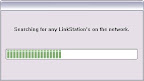
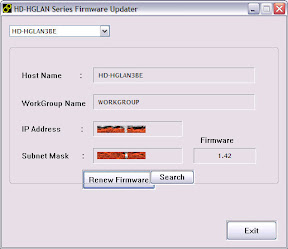
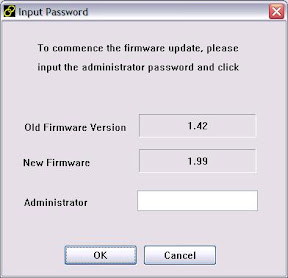
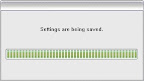

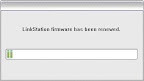

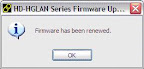
At this point I'd succesfully installed FreeLink (and with it, Debian) on my LinkStation.
About the web-based configuration utility and the machine name: Remember how I was previously able to browse to http://hd-hglan3be and see the factory-default web-based configuration utility? Well, at this point I couldn't do that any more. I hear you ask, "What happened to http://hd-hglan3be?" Two things. First, the FreeLink firmware has the machine name of "linkstation" instead of "HD-HGLAN3BE", so even if I wanted to browse a web server on the LinkStation I'd have to go to http://linkstation instead. But second, there is no web-based configuration utility in the FreeLink firmware. Don't say that the LinkStationWiki didn't warn you:
The FreeLink firmware does come with a telnet server, so I telneted into my LinkStation to make sure the installation was as successful as the installer said it was.
Next: Linux Security and Settings
Having indulged my paranoia by making sure I could restore the factory firmware if I needed to, it was time to install FreeLink on my LinkStation. The FreeLink firmware contains a build of Debian, a Linux distribution.
The steps here are a lot like the steps for restoring the factory firmware, except that you use the installer from http://downloads.linkstationwiki.net/LS1_PPC/Distributions/Freelink/ instead.
I downloaded freelink_powerpc-hdhlan-1.11.zip from that location, unzipped it and ran
HD-HGLAN FWUpdate-english.exe. I got the same string of dialogs: At this point I'd succesfully installed FreeLink (and with it, Debian) on my LinkStation.
About the web-based configuration utility and the machine name: Remember how I was previously able to browse to http://hd-hglan3be and see the factory-default web-based configuration utility? Well, at this point I couldn't do that any more. I hear you ask, "What happened to http://hd-hglan3be?" Two things. First, the FreeLink firmware has the machine name of "linkstation" instead of "HD-HGLAN3BE", so even if I wanted to browse a web server on the LinkStation I'd have to go to http://linkstation instead. But second, there is no web-based configuration utility in the FreeLink firmware. Don't say that the LinkStationWiki didn't warn you:
FreeLink is our effort to provide firmware which “frees” your LinkStation The FreeLink firmware is built upon the most recent official LinkStation firmware release. It replaces the stock LinkStation Linux build with the latest stable Debian build. Debian is one of the most popular Linux distributions. Debian is highly regarded for its simple interface and powerful package repository. The price for this is that you will lose the web based configuration tool shipped with the stock firmware - if you are familiar with Linux and your LinkStation, this should be no problem (otherwise you should consider this fact).
The FreeLink firmware does come with a telnet server, so I telneted into my LinkStation to make sure the installation was as successful as the installer said it was.
C:\>telnet linkstationYep. Looked good. You'll note, though, that
Connecting To linkstation...
Debian GNU/Linux 3.1 %h
root@LinkStation:/# exit
exit
Connection to host lost.
C:\>
root was able to log in without a password. That's one of the things I deal with in the next post.Next: Linux Security and Settings
Friday, April 6, 2007
Subversion on LinkStation #3 - Be able to recover from a firmware mistake
(#3 in my series about Subversion on a LinkStation.)
My last stop before replacing the LinkStation's factory-provided firmware with FreeLink was to make sure I could restore the factory-provided firmware in case I messed something up.
If you're following along with your own installation and you think I'm being too paranoid, feel free to skip right ahead to the "Install Linux" step. Just don't come crying to me when your firmware installation goes badly and you've bricked your LinkStation. (If you must go crying somewhere under those circumstances, try FAQ 3.7 at the LinkStationWiki FAQ: "I wish to start from scratch because my stuff is royally screwed. Where should I start?")
I know from looking at the summary page of the factory-default, web-based configuration utility that I've got version 1.42 of the factory firmware, so I navigated on over to http://www.buffalotech.com/support/downloads/ and downloaded the ZIP containing the appropriate version of the firmware (http://www.buffalotech.com/support/getfile/?HD_HGLAN_142.zip).
In that ZIP:

Important trick:
...you need to edit
So, with those files downloaded and extracted (and with the aforementioned edit to
Next: Install Linux
My last stop before replacing the LinkStation's factory-provided firmware with FreeLink was to make sure I could restore the factory-provided firmware in case I messed something up.
If you're following along with your own installation and you think I'm being too paranoid, feel free to skip right ahead to the "Install Linux" step. Just don't come crying to me when your firmware installation goes badly and you've bricked your LinkStation. (If you must go crying somewhere under those circumstances, try FAQ 3.7 at the LinkStationWiki FAQ: "I wish to start from scratch because my stuff is royally screwed. Where should I start?")
I know from looking at the summary page of the factory-default, web-based configuration utility that I've got version 1.42 of the factory firmware, so I navigated on over to http://www.buffalotech.com/support/downloads/ and downloaded the ZIP containing the appropriate version of the firmware (http://www.buffalotech.com/support/getfile/?HD_HGLAN_142.zip).
In that ZIP:
HD-HGLAN FWUpdate.exe is the Windows utility that sends bootcode.bin, firmimg.bin and image.datto the LinkStation via the network. linkstation_version.txt tells HD-HGLAN FWUpdate.exe the version number of the file set.Important trick:
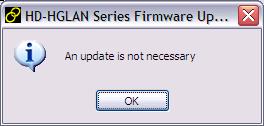
HD-HGLAN FWUpdate.exe won't let you roll back to a previous version (say from 1.46 to 1.42) or reinstall the same version (1.42 when you already have 1.42) unless you fake it out by editing linkstation_version.txt and changing the version from 1.42 to 1.99. HD-HGLAN FWUpdate.exe will then allow the rollback. So if you see one of these......you need to edit
linkstation_version.txt so it thinks this is version 1.99. (See FAQ 3.4 at LinkStationWiki's FAQs for more info.)So, with those files downloaded and extracted (and with the aforementioned edit to
linkstation_version.txt), I followed the instructions at http://linkstationwiki.net/index.php?title=The_LinkStation_firmware_flasher and was able to run HD-HGLAN FWUpdate.exe like so: Next: Install Linux
Subversion on LinkStation #2 - Set up LinkStation
(#2 in my series about Subversion on a LinkStation.)
Before I replaced the LinkStation's factory-provided firmware with FreeLink I wanted to make sure that the LinkStation was operational. (I also wanted to ensure that I could restore the factory-provided firmware in case I messed something up, which is the next step.)
I connected its ethernet port to my router and turned it on. It got an IP address from my router via DHCP and fired up its services. Its default network name is "HD-HGLAN3BE".
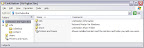
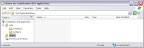
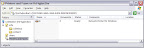
It's got an SMB-based file share that, by default, shares up some files from its hard drive that would be handy for a Windows user. When I install FreeLink I'll be disabling the SMB shares and wiping away these files, but just for the record here's what you get from the factory:


Navigating over to http://hd-hglan3be and logging in with the default, incredibly unsafe user/password combo of "root/", I see the web configuration utility:

(Note: That screen shot and many others have been redacted. For security reasons I've blotted out IP addresses and such.)
The current firmware number is right there on that screen. Mine was 1.42. If you're following along with your own installation, make sure you take note of your firmware version number at this point.
Next: Be able to recover from a firmware mistake
Before I replaced the LinkStation's factory-provided firmware with FreeLink I wanted to make sure that the LinkStation was operational. (I also wanted to ensure that I could restore the factory-provided firmware in case I messed something up, which is the next step.)
I connected its ethernet port to my router and turned it on. It got an IP address from my router via DHCP and fired up its services. Its default network name is "HD-HGLAN3BE".
It's got an SMB-based file share that, by default, shares up some files from its hard drive that would be handy for a Windows user. When I install FreeLink I'll be disabling the SMB shares and wiping away these files, but just for the record here's what you get from the factory:
Navigating over to http://hd-hglan3be and logging in with the default, incredibly unsafe user/password combo of "root/", I see the web configuration utility:
(Note: That screen shot and many others have been redacted. For security reasons I've blotted out IP addresses and such.)
The current firmware number is right there on that screen. Mine was 1.42. If you're following along with your own installation, make sure you take note of your firmware version number at this point.
Next: Be able to recover from a firmware mistake
Subversion on LinkStation #1 - Plan
I'm a source control freak. I keep all of my important documents in Subversion. OK, I keep all of my unimportant documents there, too.
I recently decided to set up a Subversion server on a LinkStation, replacing Archie, the Windows-based Subversion server that I've been running for a couple of years. Archie sucks up a lot of electicity, makes a lot of noise and hasn't been as secure as I'd like it to be.
Josh Carter did pretty much the same thing and he documented it in his article, "Build Your Own NAS/Subversion/Web/Anything Micro-Server". Unlike Josh, I'm going to use the FreeLink firmware (Josh used OpenLink) and my server is going to be dedicated exclusively to Subversion (Josh added Netatalk for Mac-friendly SMB sharing).
My LinkStation, which I purchased for US$284 at my local Best Buy, is a model HD-HG400LAN.

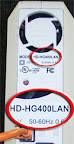
That means it's got a 400GB IDE hard drive, 266Mhz PowerPC processor, 4MB of flash memory, 10MB/100MB/1GB ethernet and two USB ports.
So here's my plan:
Next: Set up LinkStation
I recently decided to set up a Subversion server on a LinkStation, replacing Archie, the Windows-based Subversion server that I've been running for a couple of years. Archie sucks up a lot of electicity, makes a lot of noise and hasn't been as secure as I'd like it to be.
Josh Carter did pretty much the same thing and he documented it in his article, "Build Your Own NAS/Subversion/Web/Anything Micro-Server". Unlike Josh, I'm going to use the FreeLink firmware (Josh used OpenLink) and my server is going to be dedicated exclusively to Subversion (Josh added Netatalk for Mac-friendly SMB sharing).
My LinkStation, which I purchased for US$284 at my local Best Buy, is a model HD-HG400LAN.
That means it's got a 400GB IDE hard drive, 266Mhz PowerPC processor, 4MB of flash memory, 10MB/100MB/1GB ethernet and two USB ports.
So here's my plan:
- Plan (done)
- Set up LinkStation (done)
- Be able to recover from a firmware mistake (done)
- Install Linux (done)
- Linux Security and Settings (pending)
- Install Subversion on the LinkStation (pending)
- Configure Subversion (pending)
- Backup procedures (pending)
- Uninterruptible power supply (pending) (reference)
- Import from previous Subversion server(pending)
Next: Set up LinkStation
Subscribe to:
Comments (Atom)